About WeTrip
Your Trusted Way to China
U.S.-registered and backed by Nasdaq-listed WeBuy Global Ltd., supported by professional teams across Singapore, China, and Malaysia.
Follow Us




Internet is accessible in all over China, and by 2008, China had the largest cyber citizen population in the world, and there are over 630 million internet users by the end of 2014 in China. Travelers don't need to worry about the internet issue in the travel. There are many internet cafes in every city, and travelers may use these cafes to access the internet. As the coverage of WiFi expands fast over China, travelers can find free WiFi in many places. Tablets and cellphones are more used in the travel to get online.
At present, as a wireless internet access, WiFi has won its popularity among the whole China and people are more and more rely upon the use of WiFi. By the end of 2014, there were about 6.5 millions of public WiFi hotspots in China, among them, about 2 millions of WiFi hotspots are government WiFi hotspots.
Theoretically, the majority of Chinese hotels will supply Internet for travelers. There is no doubt that the starred hotels and luxury hotels will definitely provide Internet, however, not all of them are free of charge. Some hotels will charge a certain fees for the use of WiFi. Please check this information when booking a hotel. Chinese people are getting more and more rely upon free WiFi, since people are frequently communicating through social media and the costs for the network traffic cost is rather high. So most small hotels, even hostels are equipped with free WiFi to meet the demands of their guest. WiFi in these small hotels are normally free.
Just like the hotel situation, other public places, like shopping malls, cafeterias, good restaurants and tea houses, etc. are covered with WiFi by the sellers for customers' convenience. WiFi in these places will need codes to access and, and you can ask the service staffs for the WiFi code.
Notice: WiFi in the small hotels or other public places may be slow and unstable if there are many people use it, so be prepared for this situation.

Chinese government has always been participated the construction of free public WiFi actively. Since 2011, there are several cities in China has promoted the public free WiFi policy, like Beijing, Shanghai, Shenzhen, Hangzhou and Guangzhou, etc. The public WiFi hotspots are mainly located in tourist attractions, government buildings, major commercial districts, public parks, hospitals and public infrastructures like bus stops and subway. In the nearly, more and more cities are expected to join this plan.
Notice:
1. To log in the free government WiFi, travelers need to register with a Chinese cellphone number for the first time (means you need to buy a Chinese SIM card).
2. WiFi on the train: at present, WiFi on the trains is not accessible in China, except T809 from Guanghzou to Hong Kong. If the train speed is getting to 200km/h, then the WiFi signal is unstable on the train. However, since the T809, China railway is officially entering into the "WiFi Era", and in the near future, WiFi is expected to access on the train.
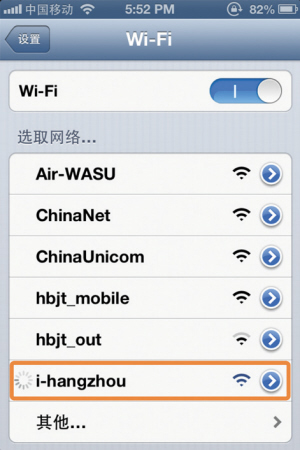
1. If you can't locate the nearby WiFi on your screen, then you can move your cellphone closer to the router or hotspot. When you use a personal WiFi, make sure the WiFi router is connected to power and turned on. If the WiFi is configured as "closed" or "private", it will not broadcast the network name to the WiFi devices. So when you join a "closed" or "private" network, first tap Setting > WiFi > Other and then, enter the WiFi network name, security and password. If the signal is low or intermittent after you join the network, then you may move closer to the router or hotspot, and check if there is anything that blocks the signal and remove it.
2. Sometimes, even though you are connected, you are still unable to access the Internet. Under this situation, you may configure the settings of the network, including DNS, IP address and Search Domain settings. You can reset the settings, including the password of this WiFi network by using "Forget this Network"; and then, use "Renew Lease" to acquire information including the new DNS, IP address and Search Domain from the WiFi network.
3. After trying the above measures, if you still can't join the WiFi or access the Internet while connected, then you can try the following: (1). Restart your device; (2). Reset the network settings; (3). By all means you still experience issues, then considering turning off the WiFi and using your cellular data connection.






About WeTrip
Your Trusted Way to China
U.S.-registered and backed by Nasdaq-listed WeBuy Global Ltd., supported by professional teams across Singapore, China, and Malaysia.
Follow Us